SHIP-TO-RECOVER FOR SAAS FOUNDERS
Turn customer cancellations into the product roadmap that brings them back.
ChurnNote finds failed payments and cancellations, explains why customers left, ranks their requests by lost MRR, and drafts the right win-back when you ship.
Free report before payment · Restricted billing access · Revoke anytime

Works with the tools already running your SaaS
Stripe
Billing
Lemon Squeezy
Billing
Slack
Alerts and communication
Custom SMTP
Email sending
Connected with a read-only key in about two minutes. View all integrations and roadmap →
How ChurnNote works.
Customer cancels, you learn why, you ship the fix, and the customers who asked hear about it first.
- 1
Learn why they left
Cancel-flow answers and replies to founder-style exit emails become structured reasons.
- 2
Rank requests by lost MRR
Each reason keeps the customers behind it and the revenue that walked out.
- 3
Ship the improvement
Build what customers actually left over, then mark it shipped in one click.
- 4
Review the targeted win-back
ChurnNote drafts a follow-up to the exact customers who asked. You send it.
See the entire recovery loop.
Three real screens, in the order you use them.
Find the leak
Churn Leak Report
Every cancellation and failed payment from your last 30 days, valued in MRR and ranked by what is still worth acting on.
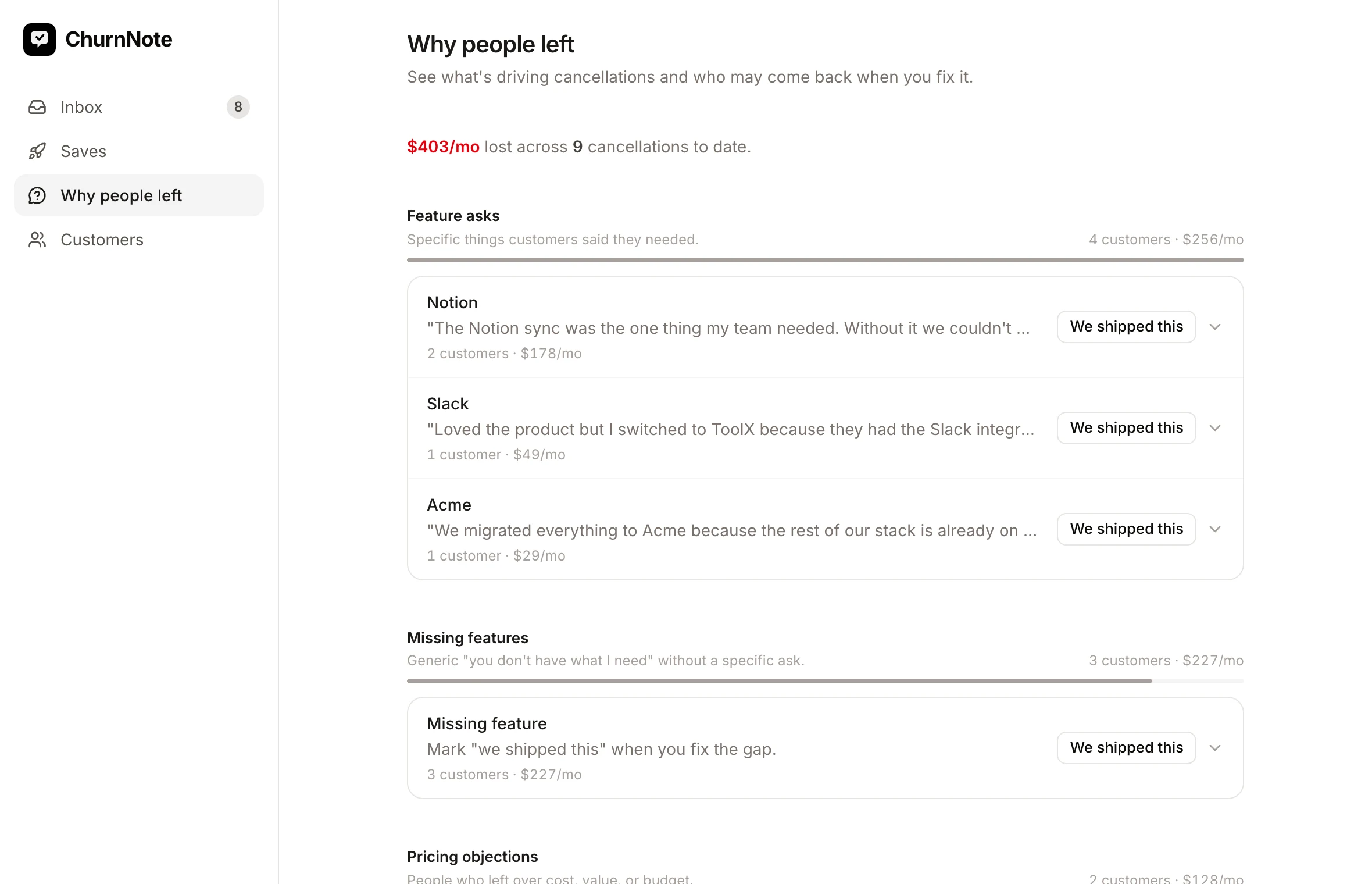
Understand what to build
Requests ranked by lost MRR
Customers answer in their own words. ChurnNote keeps the verbatim reply, groups similar asks, and prices each one by the revenue that left with it, so the build list is ordered by money rather than by whoever complained loudest.
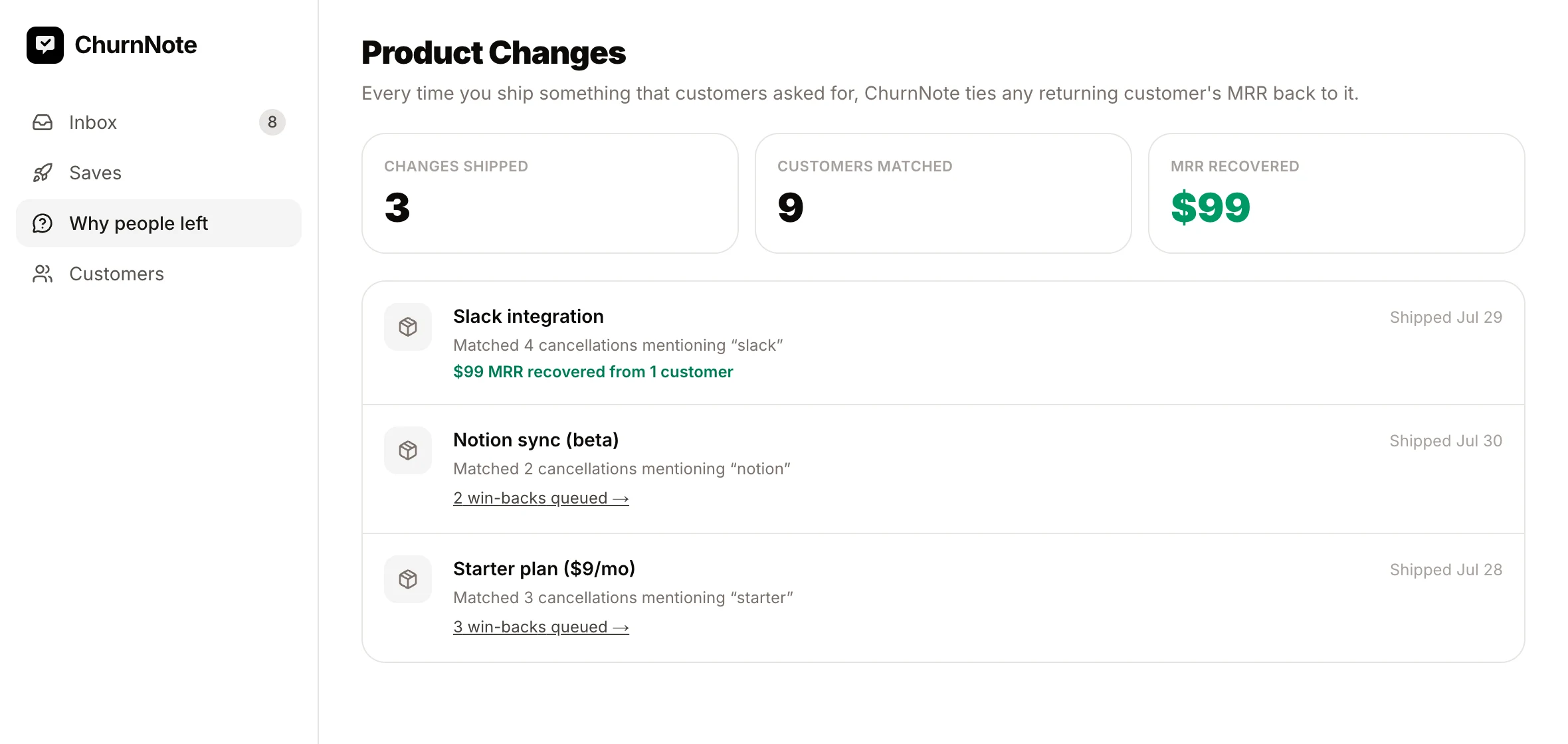
Ship and recover
Ship-to-Recover
Mark a change as shipped and ChurnNote finds the customers who asked for exactly that, drafts each of them a personal follow-up, and tracks the MRR that comes back per ship. No win-back has ever sent itself.
While you build
Also included: failed-payment recovery, cancellation save offers, churn alerts, and founder-style follow-ups that get honest replies.
Built to be trusted with billing data.
Read-only billing access, with the exact Stripe permissions shown before you paste the key. Keys are encrypted at rest and deleted with your account. ChurnNote cannot move money, issue refunds, or see card numbers, and you can revoke access at any time.
Built for founders who need the truth behind churn

Why I built this
I'm Praveen, the founder of ChurnNote. Small SaaS founders usually find out about churn too late, after Stripe or Lemon Squeezy already says “cancelled.” The reason behind each cancellation is the most honest roadmap feedback you'll ever get, and most of it is thrown away.
ChurnNote keeps that feedback, prices it, and puts it to work: see why people leave, build what brings them back, and tell exactly the right customers when you did.
Questions before connecting billing? hello@churnnote.com
See your report free. Pay when you're ready to recover.
Connect billing, run the free scan, read your Churn Leak Report, and only then decide. If it finds nothing, ChurnNote says so and keeps watching for free.
Watch
Free. No card required.
Free scan, any store size
Connect billing, get the full Churn Leak Report, and stay until there is revenue worth acting on.
- One-time Recovery Sweep of your last 30 days
- Churn Leak Report on your real billing data
- Ongoing cancellation and failed-payment detection
- New-opportunity alerts when money appears
- Weekly digest
Founder
or $290/year (2 months free)
Up to 500 active subscribers
Everything ChurnNote does, for products up to 500 active subscribers.
- Everything in Watch
- Send recovery and win-back emails (review-first)
- Failed-payment recovery sequence
- Cancellation feedback and reply intelligence
- Requests ranked by lost MRR
- Ship-to-Recover product-change win-backs
- Cancel flow with save offers
- Slack alerts and Custom SMTP
Growth
or $790/year (2 months free)
Up to 2,500 active subscribers
For scaling SaaS: the full Founder toolkit with room for up to 2,500 active subscribers.
- Everything in Founder
- Up to 2,500 active subscribers (5× Founder)
- Priority email support
Every plan starts the same way: connect billing, run the free Recovery Sweep, and see your Churn Leak Report before paying anything. No revenue cut, no per-recovery fee, cancel anytime.
FAQ
What can ChurnNote access?
Only what you grant. On Stripe you connect a restricted key with read access to customers, subscriptions, products, invoices, and events, plus write access to webhook endpoints so new cancellations and failed payments stream in. ChurnNote cannot move money, see full card numbers, create charges or refunds, or touch your payouts. You can revoke the key in Stripe or Lemon Squeezy at any time.
What happens before I pay?
Everything that matters: you connect billing, ChurnNote runs a Recovery Sweep over your last 30 days, and you get the full Churn Leak Report on your real data: every opportunity, amount, and draft follow-up. You pay only if you want to act on it. If you don't, Watch mode keeps detecting new churn for free.
Does ChurnNote automatically email customers?
Not without your review. Historical follow-ups from your report send only after you approve them and confirm your sender details. Ongoing recovery emails are drafted for you and follow rules you control, and every send honors unsubscribes, bounces, and your do-not-contact list. Failed-payment churn never gets a misleading 'why did you cancel' email.
What if the scan finds nothing?
That's a good sign, and it costs you nothing. ChurnNote will say so plainly, with no invented urgency, and offer Watch mode: it keeps recording cancellations and failed payments and tells you when a real recovery opportunity appears, with the exact amount.
See what your last 30 days of churn were trying to tell you.
Connect for free and see your report before paying.
Free scan and report. Watch mode stays free. Cancel anytime on paid plans.